Author Archives: Lynn

Let’s play!

Published by:

Gimkit, Blooket, Kahoot, and GooseChase are the four games we are going to play at the PNCFL Virtual Regional Conference this Friday night, March 5th at 7:30pm. Come experience how to play these games with your students and win prizes while learning. These are among my favorite games to play with students and here is why.

Gimkit is a gamified experience to help kids review terms. Basically, you can play several different games with a set of questions, problems, or vocabulary words. It is $59.88 per year, but I think it is worth it. They offer a 30 day free trial, with no credit card attached, and they allowed me to extend my free trial at least once. I love that GimKit was created by Josh Feinsilber when he was a junior at Issaquah high school in Seattle for a high school project. One lucky participant will win a year subscription to Gimkit in our raffle.

Classic Gimkit is similar to Kahoot but with more options. Students can compete in teams or individually. Student try to earn the most money by answering questions correctly. They can shop for power ups to receive more money per question, or buy insurance against wrong answers.

Teachers can also use the assignment feature to give homework. You set a due date, and students work through the kit at their own pace, answering questions until they reach a set goal.

What I like best about Gimkit is the different games you can play with the same set of questions. Trust No One is the new game mode in Gimkit very similar to Among Us. The objective of this mode is simple: locate the impostors and vote them off the ship. The core of this mode is the same as all other game modes: students answer questions at their own pace. However, instead of earning cash, students earn power ⚡️. The more power students acquire, the more they can help their side win!

Crewmates can use their power to run investigations on other players. Investigations help crewmates identify other crewmates. With enough investigations, you can rule out enough people to eventually find the impostors. Impostors can use their power to sabotage crewmate operations or blend in as a crewmate with investigation removers, fake investigations, and disguises. When it’s time to vote someone out, the teacher or a student can call a meeting. This is where students can discuss their observations, suspicions, and evidence. When the discussion ends, it’s time for students to vote on who they think the impostor is. The student with the most votes gets ejected off the ship. Students ejected can still participate in the game. Instead of using their power on normal actions like investigations, they’ll be able to donate their power to teammates to help their side win.

The Floor is Lava is another game mode in Gimkit. As much as they love to compete against each other, they are even better when they work together. All students work together for a common goal: to stay above the lava as long as you can!

There are other games in Gimkit we are still exploring: Humans vs. Zombies, Boss Battle, Infinity Mode, Super Rich Mode, Drained Mode, Hidden Mode.

KitCollab allows your students to create the Kit together. After students join the game, they will submit a question to be added. You can accept/reject the questions that come in. Then, you play a game of Gimkit with the Kit the class just made. This would be a great get to know each other activity by having students contribute 2 truths and a lie. A new feature on Gimkit is Ink, a place for students to publish their writing.

Blooket is another fun way to have your students practice different skills by utilizing various games modes to keep them engaged while learning. https://www.blooket.com/ Blookit is free, you can pay to upgrade, but you can do a ton with the free version. Students can play various games with the same set of flashcards or questions. Question sets can be imported from Quizlet. Sets can be assigned to individuals as homework or played as a class. Each game provides a quick tutorial. Again the classic version is a lot like Kahoot. Factory, Cafe and Racing seem to be the most popular games with students.

The games in Blookit include: Cafe, you have to feed your customers by purchasing food and serving them in a timely manner. In Factory you purchase characters who earn money for you, it includes glitches so you can mess with other people. In Battle Royale the class is in teams and races to answer questions fastest. There are power ups and slow downs. Tower of Doom is solo mode, students work through 3 different maps. Gold quest is another game in Blookit that is popular with my students.

Kahoot is an oldie but goodie. What sets kahoot apart from the rest is the ability to teach while playing the game. The teacher can control the speed of the game and stop after certain questions to explain answers or give examples. Kahoot is my favorite for formative assessment as we can see how many were right or wrong immediately while playing. Also, kahoot is the only one of these games where students who are not logged in can still see the questions and answers and therefore can still participate by writing their answers in the chat or on a piece of paper. Kahoot is still basically free and you can search and use sets from other teachers. Kahoot now has some new interactive features. You can add slides, embed videos and add multiple choice, true or false, open-ended, or puzzle type questions. You can teach from the kahoot or assign it as individual work.

GooseChase is an online platform that helps organizers create and run digital scavenger hunt experiences for team building, learning, public engagement, or a variety of other events.  Each GooseChase game has a list of missions for participants to complete. You can create your mission list using a bank of 100+ tested missions or by designing your own from scratch.

Missions have a name, description, point value and an optional link or photo to provide extra information. Sometimes participants submit a photo or video, while other times participants check-in at a specific location or solve a puzzle or riddle.

Gimkit, Blooket, Kahoot, and Goosechase are great games for the classroom or distance learning and kids love them.  Come and experience them with your colleagues this Friday night, 7:30 (PT) after the PNCFL general membership meeting.  And tell us, what are your favorite games to play with students?

The Best Thing We Can Do Right Now is Teach Them to Love Reading.

Published by:

The best gift we can give any child is the love of reading. But how do you get a child who doesn’t like to read in their first language to read in a foreign language? Start by reading to them, telling them stories, teaching them browsing strategies, and providing time and resources. There are several free and low cost options for free voluntary reading during the pandemic.

There are several free websites with digital books.

The Stories First Foundation founded by Dr. Beniko Mason and Dr. Stephen Krashen, is a great website for online short stories.

I love ebooks for kids, it has over 1,400 books in French, Spanish, Chinese, Arabic, and English.

Epic is awesome and has hundreds of books in French, Spanish, Chinese, and English. There are digital books, audiobooks, and videos at various levels. I selected some titles and linked them to this classroom library slide so students can just click on them. I change it every couple of weeks to include holidays or themes we are studying.

The Fable Cottage has free stories in French, Spanish, Italian, English, and German.

The French Experiment and The Spanish Experiment have free on line stories for students.

Check out these websites: Global Storybooks Portal , Indigenous Storybooks and https://jeunesse.short-edition.com/.

Cécile Lainé and Anna Gilcher have created a monthly publication in French called Le Petit Journal Francophone. Martin Bex has created Revista Literal, a collection of student created short stories.

Fluency matters has e-libraries and e-courses in French, Spanish, and German. Each e-library includes 5-6 books for as little as $2 per student.

Terresa Marrama, the Compelling Language Corner, has awesome e-books and e-courses in French, Spanish, and German. Most E-courses include the book, audio, and quizzes or activities. She writes mysteries and also LGBTQ+ friendly novels. She has FVR packages that include 9 books for up to 150 students for $100 for one year, or you can purchase individual titles beginning at $2 per student.

Mike Peto, My Generation of Polyglots, has e-books available on his website.
Browse the eBook library
 with novels available in French, German, Japanese, Latin, Portuguese and Spanish. Subscriptions are $29.99 per book for 1 teacher and up to 300 students. I joined his CI master class and his e-books and Maravillas are included in the subscription, it’s a deal!

Puentesebooks is the website for Jennifer Deggenhart’s novels in Spanish and French. Many of Jennifer’s books deal with identity and how important it is to know who you are. There is a FVR package of 9 novels for $100 for 150 students in Spanish. For French, there is a 5 novel package for $100 for 150 students. Ebooks can also be purchased as individual subscriptions for $2 each.

Mira Canion has 8 Spanish books for up to 300 students for $258 for a one year subscription or $68 dollars for 1 book for up to 300 students, on sale through January 2nd, 2021. The French e-library includes 3 novels for $109.00 for up to 300 students. I love her novels, I use La France en Danger and we create our own Picasso Museum as we read the novel.

Tina Hargaden has an e-literature library for $199.00 with access to all books in several languages.

Fangloo is a digital reader subscription through Teacher’s Discovery. 35 readers in Spanish for $99 for a year subscription for up to 150 students. There is a free trial.

Nothing kills the love of reading more than copious post reading activities. When I read for pleasure, I don’t normally answer comprehension questions. I prefer to ask my students, did you like the story? Another option is to have students rate the book with a star system. How many stars would you give this book?

Building Relationships and community through Zoom

Published by:

I don’t know about you, but getting students to talk when they do not have to turn on their cameras or microphones has been a struggle this year, and it looks like it will continue into 2021. Here are ten ideas to get reluctant students to respond in a zoom class.

  1. Use the rename feature in Zoom. In addition to learning each others names, students can answer questions in the rename screen and learn more about each other. For example, write two words to describe your day. Or what is your favorite: hobby, month, class, food? What do you value most or want to be? Having a question of the day as an entry task, helps me know they did not just turn on their camera and go back to sleep. The answers can be used to start class discussions and form connections. Ask students… is there someone who has answered something similar to you? Is there someone’s answer you want to know more about? You can also use the rename feature to form groups or teams. I like the rename feature in gallery view when I want to see everyone’s name and answer at the same time.

2. Another option is to ask a question and have students write their answers or give story suggestions in the chat feature. You can allow students to answer privately in chat so that only you can see their answer. A fun idea I learned from Justin Slocum Bailey to build community is ask a question, for example: If you were invisible what would you do? Have students write their answers privately in the chat and then pick say three answers. Display the three choices and the student names and have students try to guess who said what.

3. Prime the pump. Show a picture related to a topic you want to discuss, then have students list the first three words that come to mind in the chat open to everyone. Then tell them to find someone with the most similar list to theirs. This will trick them into having a connection to the topic and provide them with some key vocabulary.

4. I like to use the polling feature in zoom. Students can express opinions, which story did they like best this week? What super power would you like to have? What is your favorite color? How are you feeling today? What are you afraid of? Students can predict the results ahead of time, they can also rank order their choices.

5. Be sure to include brain breaks, breathing exercises, and movement activities into your lessons. A scavenger hunt is one quick way to do this. Tell students they have one minute to go find something red. Have them hold their item close to the camera, take a screen shot and then have them hold their item far away from the camera and take another screen shot. Discuss one or two items, look for similar or unusual items. You can use these screenshots to do a short write and discuss. Here are some free scavenger hunt resources from Spanishmama.com

6. Use the white board feature in zoom, (although I prefer Jamboard but that’s a future post.) You and/or the students can write on the white board using the text or draw features. Students can listen to a story and draw a picture, or write a short text to demonstrate understanding. There is a stamp feature. Students can be given a choice of options and they stamp their choice.

7. Use conversation starters like would you rather? Would you rather be able to fly or be invisible? Would you rather have three eyes or two noses? There area several ways you can have students respond. You can number the choices and have students hold up one finger or two. You can use the stamp feature on the whiteboard or just have students move or point to one side of the screen or the other to get some movement involved.

8. Students can also use the reaction symbols in zoom to respond. They can react with clapping hands, thumbs up, a heart, joy face, open mouth, and tada. How can we better incorporate these reactions to connect with students reluctant to speak or turn on their cameras?

In addition to the reaction symbols, teachers and students can give and receive nonverbal feedback using the symbols at the bottom of the participants window. Students can answer yes/no questions. They can express likes and dislikes with thumbs up or thumbs down. I can use the hand for questions, or to judge how many people think they know the answer before taking volunteers. They can tell me to go faster or go slower. They can also tell me they need a brain break, or clap to show appreciation.

9. Partner interviews, discussions, mixers, or group work can be done in break out rooms. I use them sparingly as I am finding that not all kids like the breakout rooms. As usual, clear objectives, a set period of time, and some accountability help. When coming back together be sure to ask them for their partners answers so they actually have to listen to each other to complete the task. I emailed each student a fake age between 1-100 and they had to find out each other’s fake age in the break out rooms.

10. Teach students to change their virtual background. Then they do not have to show their actual workspace if they do not want. There are several available through a google search. Students can also change their virtual background to answer questions like where would you go if you could travel now? Look for similarities among answers. Or post a picture of what you had for breakfast this morning, or would like to have for breakfast each morning. Who has the healthiest breakfast? Find a picture of your favorite animal or pet and post it to your virtual background so we can talk about it.

Teachers can change zoom backgrounds to include maps, locations, sweet 16 verbs, rejoinders, and question words. Keep pictures you want to use in zoom virtual backgrounds so that they are not in between you and the students, like they would be if you were showing a power point. You can put your entire presentation as Zoom virtual backgrounds and switch them as needed. This is a French version of a sweet 16 verb chart adapted from Mike Peto.

Finally, I encourage kids to say good bye to me either my unmuting, typing in the chat, or turning on their camera and waving goodbye to me. I ask them how I am doing and to give me some feedback. I tell them it is hard to teach to blank screens. And every once in a while a shy kid hangs around after class and tells me “Your doing a good job, you’re my favorite teacher” and it makes it all worth it. How do you build community and get reluctant students to respond in a virtual classroom? Share your ideas here.

Provide Personalized Input and Build Community

Published by:

My day was made by a 50 second response. As part of the Agen online conference, participants were asked to record a short introductory video about themselves on Flipgrid including one fun fact.

Flipgrid was not new to me, I had used it for years to assess speaking ability and show student growth. However, I rarely responded to student videos other than to say good job, or with tips on how to level up.

And then one day in my inbox I had a reply to my video from my teacher idol, Jason Fritz.

I immediately went to Flipgrid and see what Jason had said. His 50 second response to my video made me crazy happy. The fact that he listened to my video and took the time to reply made me feel valued. Jason said that he thought we had met before, and reacted to my fun fact by adding skiing graphics and goggles in his response.

In that moment, I realized the power of this free platform for providing additional individualized input, forging relationships, and providing asynchronous interpersonal speaking opportunities to build community.

Here are some “Tips I learned from Fritz” at that awesome conference. When setting up a grid, choose your target language in the captions so that all videos recorded or uploaded by you and the students will have the option to use closed captions. You can edit the captions if the program does not capture all words correctly.

Record yourself asking the question or prompt in a video and add captions so they are reading at the same time. Then, create a sample video of the response you would like for more input. You can also provide attachments, links, sentence frames and other supports.

Students can click on the blue dot to use the immersive reader feature and listen to the text read by native speakers. Students can click on a word that they do not know and Flipgrid provides an image or translation to show the meaning of the word.

Students can use stickers, gifs, or the Snapcam app to add interest or disguise their faces. The teacher can also use the hide video option if a student requests it.

Teachers can reply to students videos for extra input and to establish relationships. You can record a response video and/or type a response. Use all characters possible in your response to provide even more input and additional personalized vocabulary.

Require students to respond to at least three other videos to build community. Train students to watch other student videos before answering for added input and ideas.

Here is another great idea from Jason. Type up student responses in Flipgrid to create readings or informational text about the class.

With Flipgrid, every student has a voice. They can record asynchronously for extra practice outside of class so class time can be used for other things. Also, by listening to each others videos first, they are getting additional input and hopefully building relationships.

Make every student feel heard this year, record personalized responses to student videos in Flipgrid to offer additional input, provide interpersonal communication opportunities, and establish community.

https://flipgrid.com/37931006

Class at Home

Published by:

If you are suddenly transforming a home space into a classroom here are some ideas for you. There are all kinds of free resources available to support students from home. I did a blog at the beginning of the school year with links to free resources available to support student learning while decorating your room at the same time. Now that we are turning our homes into classrooms, I thought it might be a good time to repost. I have these circumlocution posters in my classroom but decided to print out a set for my home classroom.

At first I had them taped to my whiteboard but realized this is going to be a pain going from French to Spanish. So I came up with this.

I strung a piece of twine and used clothespins so I can switch them out easier. There are lots of question word posters available for free that you can print out at home, or make your own with markers.

I had an old white board in my office that I covered with white board paint. You can see the difference in the two photos above. You can buy white dry erase paint and put it on anything to create a white board. However, an old white binder works also. Even though there is a white board function in Zoom, sometimes it’s a nice change to go old school.

I revived and old cork board by covering it with fabric and hot glued some framed postcards from Paris onto it.

Don’t forget to add plants to your work space. They help clean the air. I just went out to my yard and cut some bamboo and clipping off other plants. I like baskets and boxes for stashing miscellaneous things.

Surround yourself with things that inspire you or bring you joy. You can print inspirational quotes off the internet and frame them, or have pictures of your favorite people near by.

I wanted to change my zoom backgrounds, but couldn’t find our green screen. So I looked around the house and found a Seahawk’s blanket that works great, sheets, paper it doesn’t really matter.

This is now my recording studio.

Tina Hargaden posted a really cool assignment called where I work today. Each student added a slide to a google slide show with a picture of where we are working these days and some sentences about our space. It was really interesting to see all the different places and ways people are working. I think I am going to try it with my students this week.

Where is your work space and does it bring you joy? Post your current work space photo here with a short description.

Let’s just chill!

Published by:

Let it go…the online lesson planning, the grades, the evaluations, the hysteria. Let’s just chill. A few weeks of missed instruction is not going to damage anyone in the long run.

Teachers, like first responders, are also stressed and have their own health concerns along with those of their families, children, and elderly parents to deal with. Many teachers have never used Zoom or other online formats and are stressing over an uncertain future. This is a very sensitive time for all.

Let’s reconsider mandatory online learning. Instead, let’s just regenerate, so we can be centered and fully present for our students when we return.

To expect all families and teachers to have the resources and skills to move to distance learning this quickly is beyond ambitious. Many families don’t have internet access, computers, desks, and other school supplies. The student’s home learning environments will vary greatly. Schools provide a stable, equal, and resource rich learning environment whereas homes, for those students that have a stable home, will be filled with distraction and competition for space and resources. It will not be a “Home School” environment as a majority of households are two worker families. This new learning environment will be unsupervised. We need to dial down the pressure on families and teachers right now. We should give students, “suggested activities” to do but not require it.

Students really need less screen time not more. Trying to do a mixer activity these days, where students walk around and get information from each other face to face, is painfully awkward to watch. Students are addicted to their phones and computers. The social interaction at school is a vital part of their ever diminishing interpersonal relationships. Since students in our district were provided their own computer several years ago, I have observed a steady decline in student social skills.

Let’s look at this as a sign from the universe. A time to relax, recharge, rejoice in the down time. I am looking forward to organizing my home, enjoying some neglected hobbies, and connecting with friends and family.

Let’s just all stay home for the next few weeks and enjoy the time that we never have with our families and loved ones in our own home. Cook, read, play games, take a walk, and just chill.

La Familia Real

Published by:

The objective: I can describe my family and friends. This includes family vocabulary, physical descriptions, ages, birthdays, hobbies, origin, professions, and more. I like to use the royal family of Spain to embed culture and hook their attention. I print colored photos of the royal family and describe each one as I create this árbol de familia on the board. I have students follow along and fill in the names on a family tree I found on this website.

After my presentation, I have them watch this video. There are some great resources at this website including a script for this video. I love this blog because it is written by a French teacher who teachers Spanish.

¿Quién es? Then a game of who is it?

Read these descriptions to the students and have them guess which royal you are describing.

  1. Su cumpleaños es el 5 de enero, 1938. Él tiene ochenta y dos años.   Él es viejo. Él tiene pelo gris. Él no tiene mucho pelo. No es delgado.
  2. Ella tiene ojos verdes y pelo castaño.  Ella es bonita y vieja. Su cumpleaños es el 2 de noviembre, 1938.  Ella tiene ochenta y un años. 
  3. Ella es rubia.  Ella tiene los ojos azules. Su cumpleaños es el 31 de octubre, 2005.  Ella tiene catorce años. Ella es la futura reina de España.  Es la primera al trono.
  4. Él es alto y delgado.  Él tiene el pelo castaño y ojos azules.  Él tiene 51 años. Su cumpleaños es el 30 de enero, 1968.  A él le encanta la vela.
  5. Ella es guapa.  Ella tiene pelo castaño y ojos marrones. Ella tiene 47 años. Su cumpleaños es el 15 de septiembre, 1972.  Ella trabajó como periodista.
  6. Ella es rubia.  Ella tiene los ojos verdes.  Ella es bonita y delgada. Su cumpleaños es el 29 de abril de 2007.  Ella tiene doce años.  Ella es segunda al trono.

Another option is to give students envelopes with the descriptions and the pictures and have them race to match them up.

Here is a link to some on-line activities for additional practice. How is your family similar to or different from the Royal Family of Spain? Would you like or not like to be a part of the royal family?

Bracketology

Published by:

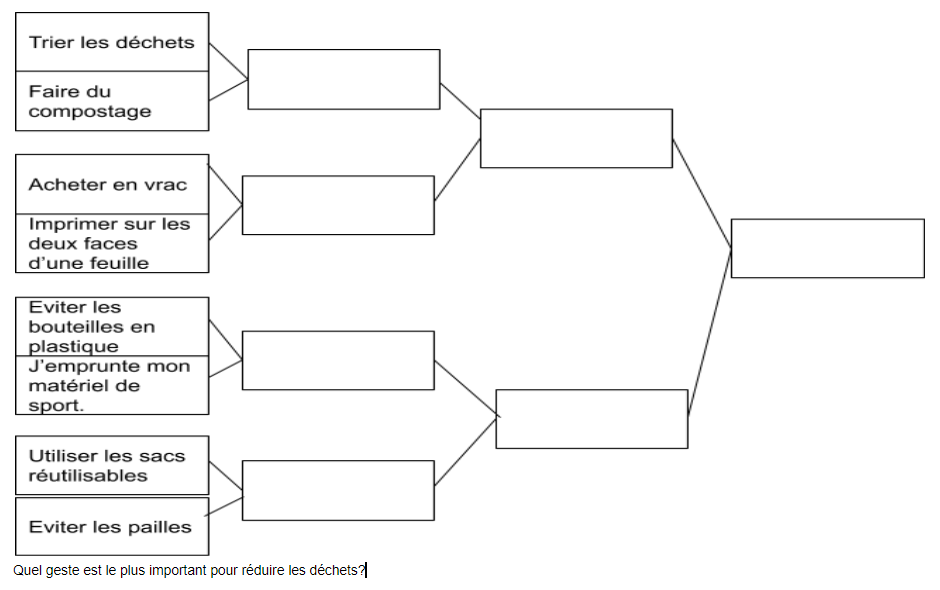
I learned a new term at ACTFL 19… Bracketology. I heard it in a presentation by Lisa Shepard. She used this example about things we can do to help the environment. Students discuss each pair of choices in order to select which will move onto the next round.

So I started thinking, this is a great format for any topic. Create a list of 8 or 16 things to be grateful for, unusual holiday traditions, things kids want for Christmas, things you can do to stay healthy, or reasons to study a language. Pair them up in brackets, and have they kids discuss and then vote on each pairing until the champion is determined.

Or, have kids create their own brackets around a topic. Then have the class debate and vote… hot dogs vs hamburgers, pizza vs tacos. Or use bracketology for hobbies: football vs. soccer, winner takes on baseball vs. volleyball.

8 Team Single Elimination Tournament Bracket : Front

Of course bracketology in not a new idea. Many world language teachers do March music madness and have students choose between popular songs. What about creating brackets for 8 holiday songs?

There are brackets created for children’s books and novels in the target language. Make your own with these blank book brackets.

One of my favorites are the brackets for Chrismas commercials by Dustin Williamson. There are resources on Teachers Pay teachers, some are free like Noel madness.

How can you incorporate bracketology in your classes?

It’s TPEP time again, criterion # 3 revisited…

Published by:

The TPEP criterion #3 is recognizing individual student learning needs and developing strategies to address those needs.  The overlap in the three frameworks is identifying and addressing the needs of students and establishing and achieving student growth goals for subgroups.

One way to show that you are actively seeking information about students is student interest surveys.  I have gathered some on this pinterest page.  

Take the survey to another level by trying Back to School Scoot!  To do this, place a task card on each desk (or chair).  Students start at any number.  At your signal, have the students rotate around the desks until they have answered all of the questions. Give the students enough time to read the question and answer it before having them rotate (1-2 minutes). I find it works best in middle school to have them rotate in order, but I have tried it where I just yell “Scoot” (¡Muévanse!) and they scramble to any other seat to which they have not been and just fill in the answer to that question in the appropriate box.  Scoot could be done in English at the novice level and there are sets available in French and Spanish for upper levels.

Another option is to tape the questions around the room or out in the hallway, you could also have the students work in pairs, and rotate at your signal.  I use these types of activities throughout the year so this allows me to teach procedures and expectations while getting to know more about their individual preferences.  Other variations for student interest surveys include creating an on-line Google form or back to school Jenga.  

I also like the play dough idea for getting to know students from the book Teach Like a Pirate by Dave Burgess.  When students walk in on the first day of school have a can of play dough on a paper plate of each desk.  Tell the student to create something with the play dough that is in some way representative of themselves.  Tell the students that they will not have to get up in front of the room and speak but they will have to say their name and a sentence or two about their creation.  Then circulate around, show each creation, ask each student’s name and a question or 2 about the creation.  At the end of the activity offer a prize for anyone who remembers everyone’s name.  See my prior post for other ideas on making connections with students.

Criterion #3 also includes effective teacher use of formative assessment data.  Teachers can establishing student growth goal(s) and document student growth and achievement of student growth goal(s) with free writes and video recordings at various stages throughout the year.  My students have chromebooks and we use Wevideo and Flipgrid to record student growth as well as good old fashioned paper and pencils.

Here is a link to a previous post on Tpep #3.

Tpep Criterion #3: Recognizing individual student learning needs and developing strategies to address those needs.

Getting to know our students, using formative assessment data, scaffolding of information within lessons, differentiating instruction, and demonstrating flexibility and responsiveness are some of the strategies the distinguished teacher uses to address student needs.  How do you support individual student learning needs?